Updated October 14, 2026. Written for PhotoCraft 0.8.2 (what changed since).
Steps
- Open the editor at easyruncraft.com/photocraft/editor. The first visit downloads the app; later visits open it from the browser cache.
- Open your file with File › Open, or drag the .psd or .psb from your desktop onto the canvas.
- Check the Layers panel. Groups, masks, adjustment layers, smart objects and type layers each have their own row, as they do in Photoshop. Then look at the type: a font the browser doesn't have shows as a substitute (see fonts).
- Edit. Change the words of a type layer with the Type tool, switch adjustment layers on and off, move and transform layers. The menus and shortcuts follow Photoshop's.
- Save. File › Save As… downloads a PSD. For a flat image, File › Export › Export As… writes PNG, JPEG or WebP, and File › Export › Quick Export as PNG writes the whole image as a PNG without the dialog. Everything arrives as a normal browser download.
Layer › Quick Export as PNG, in the Layer menu, is a different command: it exports only the selected layer, cropped to that layer's pixels. That makes it the quick way to pull a logo or a product shot out of a layout, and the wrong one when you want the whole design.
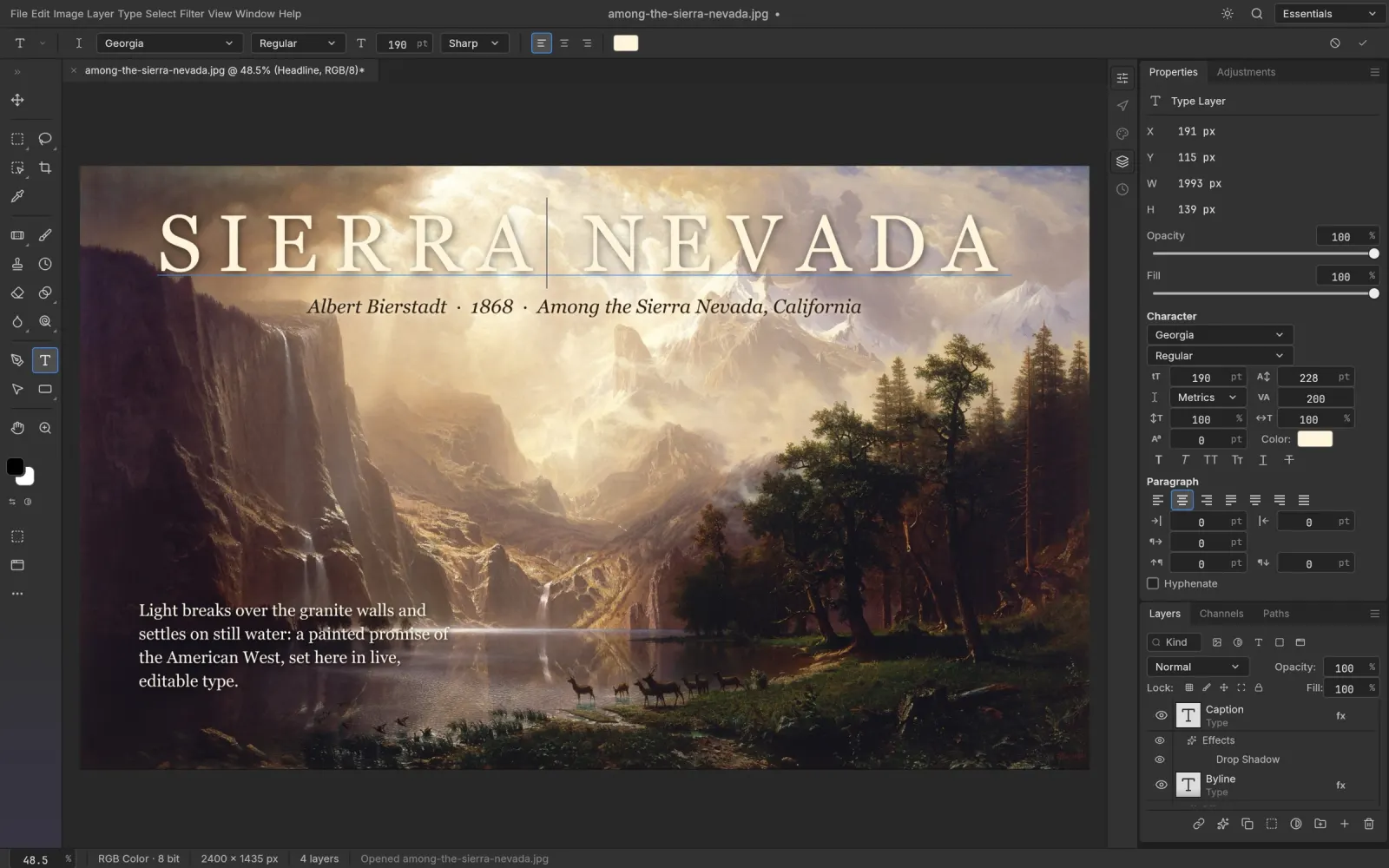
What stays editable
- Layers and groups, opacity, fill and 27 Photoshop blend modes
- Pixel masks, vector masks and clipping masks
- Adjustment and fill layers: all 16 adjustment types, among them Levels, Curves and Hue/Saturation, plus solid, gradient and pattern fills
- Type layers, with their font, size, tracking and leading
- Layer styles: shadows, glows, bevel, satin, stroke and overlays, including patterns stored in the file
- Smart objects, with their smart filters
- Shape layers. All 116 shape layers in PhotoCraft's PSD test files render the same pixels as in Photoshop
Print and retouching files open too: PSB, 16-bit and 32-bit documents, and CMYK and Lab color all load natively, without a conversion on the way in.
Saving it back for Photoshop
Opening and re-saving a PSD keeps the rendered result for 307 of the 309 files in the psd-tools test set. Parts of a file PhotoCraft doesn't handle yet are carried over into the saved PSD instead of being dropped.
The saved file is not a byte-for-byte copy of the original, though. PhotoCraft writes the layer records, image resources and the flattened preview again from its own model. For that reason we'd save edits under a new name (File › Save As…) and keep the original until the person who works in Photoshop has opened your version.
Missing fonts
A browser can't use the fonts installed on your computer, so text set in a font the editor doesn't have shows with a substitute until you change it. The PhotoCraft web build has two fonts of its own, Inter and JetBrains Mono. On easyruncraft.com the font menu also offers 39 open-license families, each downloaded the first time you use it:
Noto Sans CJK SC · BIZ UDPGothic · BIZ UDMincho · Shippori Mincho · Noto Sans Arabic · Noto Sans Thai · Noto Sans TC · Noto Sans KR · Noto Sans SC · Noto Serif SC · Noto Sans JP · Roboto · Open Sans · Montserrat · Lato · Poppins · Inter · Raleway · Nunito · Work Sans · DM Sans · Space Grotesk · Oswald · Bebas Neue · Anton · Archivo Black · Playfair Display · Merriweather · Lora · DM Serif Display · Abril Fatface · Lobster · Pacifico · Dancing Script · Caveat · Great Vibes · Bangers · Righteous · Roboto Mono
Type › Resolve Missing Fonts… lets you pick a replacement for each missing font, and Type › Replace All Missing Fonts swaps them all at once. When a commercial or brand font has to render exactly, use the desktop app, which reads the fonts installed on your system.
Other layered files
The same editor opens layered TIFF files, OpenRaster (.ora) from Krita, GIMP and MyPaint, Paint.NET .pdn files and Affinity documents (.af, .afphoto, .afdesign, .afpub). Affinity and Paint.NET files are read only: PhotoCraft opens them with their layers, and you save the result as a PSD or another format. An SVG opens as editable shape layers. To find which free app opens a file that isn't an image, the hub guide which free app opens your file sorts them by extension.
Before you close the tab
The browser version has no autosave and no crash recovery. If the tab reloads, unsaved work is gone, so use File › Save now and then; each save downloads a fresh copy of the PSD.
Need a PNG or JPG for the web? Converting a PSD to PNG or JPG covers what flattens and what to check first. On a Chromebook or Linux, editing a PSD there covers the browser and the native packages, and PhotoCraft vs Photopea compares the two free browser editors.