What is AniCraft?
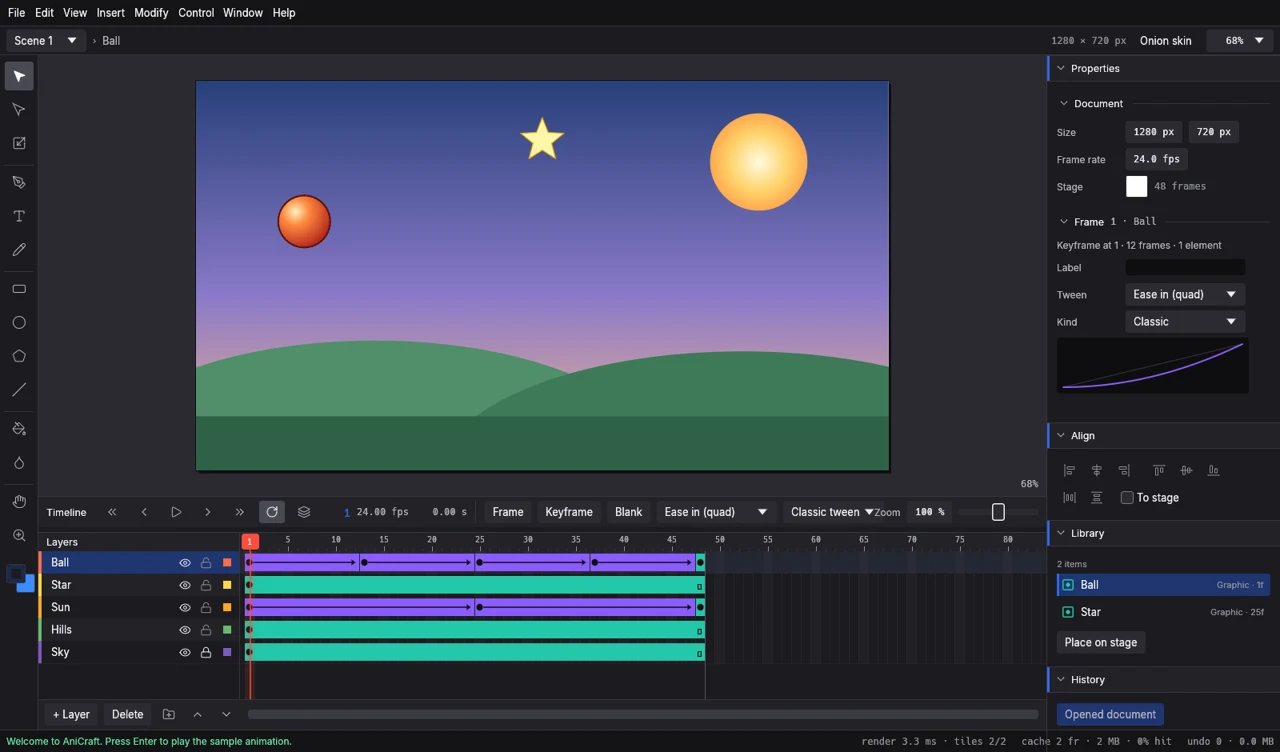
AniCraft is an open-source 2D vector animation studio. Its stage and timeline keep artwork, symbols and animation editable in a native .anicraft project.
Use it for a short title, an animated illustration or a looping motion study. EasyRunCraft brings the original browser editor together with shared accounts and AI credits.
Why use AniCraft online on EasyRunCraft?
Start in your browser
Open an .anicraft project or choose a homepage example.
See the animation as you work
Use the stage, timeline and playback controls to review motion.
Keep the editable result
Download the native project and reopen it for later changes.
Start with the free manual tools. When you want AI help, one EasyRunCraft account and credit balance covers supported hosted services across the suite, including the built-in Agent and MCP processing.
What can you do with AniCraft?
Draw vector artwork
Create shapes and text and arrange them on named layers.
Animate with the timeline
Use keyframes, classic tweens and motion paths to control movement.
Organize scenes and symbols
Reuse artwork and work on different parts of a movie without flattening them.
Share your work
Save .anicraft projects and use the editor’s supported image, GIF, SVG and HTML export commands. Browser video encoding differs from desktop.
A short welcome animation
Turn a static welcome card into a short entrance animation. Keep the background and message, animate the title and compare the timing in the timeline.
Files, projects and exports
| Format | Use it for | What to check |
|---|---|---|
| .anicraft | Editable animation project. | Download a copy before leaving. |
| SVG / FLA / XFL | Upstream artwork and animation import workflows. | Check unsupported effects or fonts after importing. |
| PNG / GIF / SVG / HTML | Outputs provided by the native editor. | The Agent download returns an editable project; choose other exports in the editor. |
Keep an editable project as well as the finished output. The browser and desktop editions can use different releases; check the chosen build before depending on a particular format or feature.
How to use AniCraft online
- Open your artwork. Choose a sample or open a native project.
- Describe the motion. Ask for the result you want, then review the stage and timeline.
- Keep a copy. Download the editable animation and use the export suitable for your next step.
Your account provides AI access, not cloud project storage. Keep downloaded .anicraft copies.
Work with the built-in AniCraft Agent
The website Agent reads the current stage, scenes, layers and keyframes, discovers the running engine’s commands and applies a complete animation plan.
The editor checks state before each command. Plans use native undo if an operation fails, and the result stays open for manual editing.
Make the title slide in gently and settle in the middle. Keep the rest of the card the same.
Review the result in the editor. Supported document edits use native undo, so you can reverse a change while keeping control of the project. AI assistance uses account credits; manual editing remains free.
Use AniCraft through MCP
AniCraft MCP keeps a private native session for an uploaded project. Your agent discovers commands from the actual CLI, edits the animation and retrieves saved outputs.
The MCP session is separate from your browser project. Download the updated project or export before closing it.
Animate the title in welcome.anicraft, then give me the editable project.
Connect Codex, Claude Code or a compatible client using MCP setup. The AniCraft MCP guide lists available operations and limits. Your agent works on an uploaded copy and returns results; it does not control the project open in your browser. Download the output to keep it.
AniCraft online or desktop?
The browser is convenient for manual editing and integrated AI assistance. Desktop adds direct filesystem workflows and platform-dependent export tools.
| Workflow | Online on EasyRunCraft | Original desktop app |
|---|---|---|
| Animation | Browser stage, timeline and native editing commands. | Installed editor and direct file access. |
| AI | Shared EasyRunCraft credits. | Your external agent through native MCP. |
| Saving | Download projects and supported browser exports. | Save directly on your device. |
Download the original desktop app
Open the AniCraft releases on GitHub, expand Assets, and choose the package for your operating system and processor. Follow that release’s installation instructions. For immediate browser access, open the online editor.
AniCraft guides and source
AniCraft comes from the ArtCraft Team and its contributors. EasyRunCraft independently hosts the community browser build. Find the original code, documentation and releases in the AniCraft GitHub repository; preserved license information is available through About & credits.
Explore all ArtCraft Crafting Apps available online on EasyRunCraft →
