WordCraft
Word documents
Open and edit documents with familiar writing and formatting tools.
Common inputsDOCX · ODT · Markdown
Browser version: Loading… · Source ↗
ArtCraft online · An EasyRunCraft guide
EasyRunCraft independently hosts 17 browser workbenches built on ArtCraft’s open-source Crafting Apps. Edit documents, PDFs, spreadsheets, photos and creative projects in one place.
Free manual editing. No desktop installation. No account required.
Optional AI Agent and hosted MCP processing use account credits.
Find your workspace
Open a workspace for free manual use, without an account. Each entry links to the editor, its app guide and original source. Common inputs are listed below; format support varies by build.
Word documents
Open and edit documents with familiar writing and formatting tools.
Common inputsDOCX · ODT · Markdown
Browser version: Loading… · Source ↗
Spreadsheets
Work with cells, formulas, charts and real .xlsx files.
Common inputsXLSX · CSV · TSV
Browser version: Loading… · Source ↗

Presentations
Build slide decks, work with layouts and open .pptx presentations.
Common inputsPPTX
Browser version: Loading… · Source ↗

PDF editing
Read and organize PDFs, fill forms, add comments and save a copy.
Common inputsPDF
Browser version: Loading… · Source ↗

Photo & PSD editor
Edit layered photos with masks, adjustments, type and PSD files.
Common inputsPSD · PNG · JPEG · WebP
Browser version: Loading… · Source ↗
RAW photo editor
Develop RAW photos with sliders, presets and local adjustments.
Common inputsPhotos · supported RAW files
Browser version: Loading… · Source ↗

Vector illustration
Draw paths and shapes, arrange artboards and work with SVG artwork.
Common inputsSVG
Browser version: Loading… · Source ↗
UI design & prototyping
Build screens and prototypes. Download and reopen native .figcraft designs.
Common inputs.figcraft · images
Browser version: Loading… · Source ↗
Page layout
Arrange text and image frames, design pages and export a PDF.
Common inputsIDML
Browser version: Loading… · Source ↗
3D texture painting
Paint 3D models with PBR materials, layers and masks. Save projects and export textures.
Common inputs.tcraft · GLB · OBJ
Browser version: Loading… · Source ↗
Procedural materials
Build tileable PBR materials with connected nodes and live 2D and 3D previews.
Common inputs.mcraft · SBS
Browser version: Loading… · Source ↗

Video editing
Cut clips, grade colour, mix sound and export a finished video.
Common inputsMP4 · WebM · MOV · audio
Browser version: Loading… · Source ↗

Motion graphics
Animate compositions with layers, keyframes, effects and video exports.
Common inputsImages · video · audio
Browser version: Loading… · Source ↗

2D vector animation
Animate vector artwork with scenes, layers, keyframes and motion tweens.
Common inputs.anicraft
Browser version: Loading… · Source ↗

Audio editing & mixing
Import audio or MIDI, edit tracks and save or bounce your mix.
Common inputsWAV
Browser version: Loading… · Source ↗
2D CAD drawings
Draw with familiar CAD commands, layers and dimensions. Open and save DXF files.
Common inputsDXF
Browser version: Loading… · Source ↗

File & software inspection
Identify files and understand their evidence. Use native MCP for deeper software inspection.
Common inputsBinary files · code · data
Browser version: Loading… · Source ↗
Craft Anything provides file inspection in the browser. Its native software exploration capabilities differ from the web viewer.
From file to finished copy
Start with a small file you know. Here is a straightforward document workflow using WordCraft.
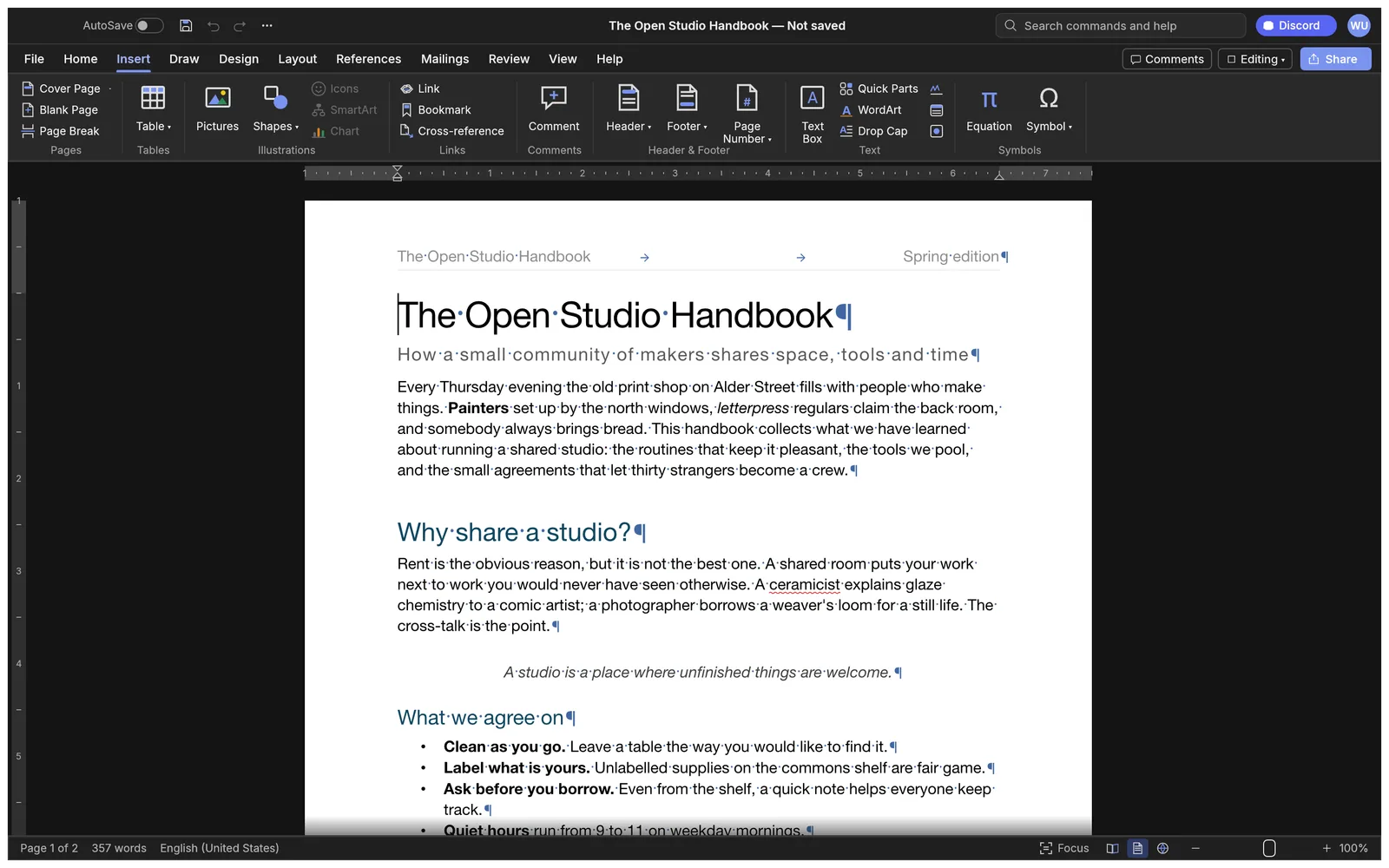
Open WordCraft for a document. Use the directory above for a PSD, spreadsheet, PDF or another task.
Open WordCraft →Create a document or open a supported local DOCX through the File menu. Edit the text, then review headings, tables and page breaks.
Download an editable DOCX, or export a PDF for sharing. Open the saved copy to review its layout before closing the editor.
Try a manual task · No account or credits needed
Use our fictional sample document to try the full workflow yourself.
Download the sample DOCXA little context
ArtCraft creates the original projects. EasyRunCraft independently hosts community browser builds and adds optional Agent and MCP services. We are not an official ArtCraft service.
The original open-source projects
The individual tools from the ArtCraft team: word processing, photo editing, spreadsheets, design, media and more.
Official Crafting AppsThe browser service you are using
Open the hosted tools for free manual use. One EasyRunCraft account provides access to optional AI assistance and hosted MCP processing with credits.
About EasyRunCraftThe separate generative application
ArtCraft’s app for composing scenes and generating images and video. It has its own official desktop and web experience.
Official StudioChoose the right way to work
The browser builds run on your device using web runtimes, including WebAssembly. Their capabilities depend on the editor, browser and hardware.
| What matters | Online on EasyRunCraft | Upstream desktop apps |
|---|---|---|
| Getting started | Open an editor URL. No installation or account for manual work. | Download an upstream release for your operating system and install it. |
| Files & saving | Choose local files and download your work. Account sign-in does not provide a cloud project library. | Use the native app’s supported file and project workflows on your machine. |
| Fonts & compatibility | Browser fonts, supported imports and available codecs affect the result. Review layout and exports. | Local fonts and native integrations depend on the app and release. |
| Performance | Uses your device through the browser. Large images, textures and media can exceed browser memory or graphics resources. | Consider native apps for long sessions, larger projects and workflows that need local system resources. |
| Features & versions | Community browser builds may include EasyRunCraft bridges. Some native features are unavailable on the web. | Features follow the installed upstream release. Browser and desktop builds need not match. |
Fonts and imported document layout can differ from a desktop word processor. Agent paragraph changes require matching document identity, revision and exact source text; unsupported content stays available for manual editing.
Formula and file compatibility can differ from other spreadsheet programs. Agent writes are limited to supported ranges and checked against workbook and sheet identity. Review formulas and keep a backup of important workbooks.
Fonts and imported slide layouts can differ from the original presentation. This browser workbench does not provide desktop AutoRecover. Review each slide and save a copy of important changes.
Permissions can make a PDF read-only. The Agent does not provide scanned-text editing, signature editing or secure redaction, and text edits do not support general paragraph reflow. Native undo applies to supported edits.
Save before leaving the tab: this PhotoCraft browser build has no autosave. Fonts and browser memory can affect a document, and installed desktop fonts are not automatically available.
RAW format support varies by camera and build. Browser storage belongs to this site, and clearing it or using a private window can lose local library data. Large libraries and long batches are better suited to a desktop workflow.
Import compatibility and available fonts vary by format and build. The Agent supports a guarded set of shape, fill, position and point-text edits; it cannot safely modify every kind of vector object.
Direct .fig import and some file workflows require the desktop edition. Component, auto-layout, style and live-session guards restrict Agent changes. Do not treat a shared account as cloud design storage.
Fonts, linked assets and export features can differ from desktop workflows. The Agent blocks primary stories using Smart Text Reflow and restricts edits to supported frame types to avoid unintended page changes.
A WebGPU or WebGL2 browser and enough device memory are required. Large texture sets can exceed browser resources. Download a project backup before leaving.
Download a package before leaving. Signing in does not synchronize material projects across devices.
Large or long videos can exceed browser memory and processing limits. Codec support depends on the source file and browser. Desktop editions are better suited to long sessions and heavier export workloads.
The browser build cannot open After Effects .aep projects. GPU support, available fonts and browser memory affect what you can preview and render. Browser-stored work can be lost when site data is cleared.
Your account provides AI access, not cloud project storage. Keep downloaded .anicraft copies.
Recording and some advanced audio workflows require the desktop edition. Agent edits are restricted by playback, group, automation and clip guards. Save the session before leaving the tab.
DWG workflows and some plotting features require the desktop edition. Agent commands are restricted by layer, group, block, 3D, constraint and other guards. Supported Agent edits focus on model-space 2D entities.
The input remains in the browser viewer. AI assistance sends the selected evidence context to the configured model; the account does not store a cloud project library.
Need a native workflow? Find official desktop downloads →
When you want a little help
For a task such as revising the introduction of a document, choose how you want to work. Supported AI actions vary by editor.
01 · Manual editing
Open the document, select the paragraph and revise it with the editor’s writing tools. Review the page and save a copy.
Free · No account neededOpen WordCraft →02 · Built-in AI Agent
Ask: “Make the introduction clearer and keep the dates unchanged.” Review the changes applied to the open document, and use native undo when needed.
Account & creditsAI plans & credits →03 · Your agent through MCP
Connect a compatible client, upload a copy and ask it to inspect or edit the file using available operations. Download the result; the browser document is a separate workspace.
Account & creditsSet up MCP →Credits & transparency
The original Crafting Apps are created by the ArtCraft team and contributors. EasyRunCraft is independently operated by MizhiSmart and is not an official ArtCraft service. Our maintained browser builds include integrations for the hosted experience.
Original copyright notices and license texts are preserved. Manual browser work is free; optional AI and hosted MCP processing use credits. Manual editing runs in the browser; AI sends relevant context or attachments for processing, and hosted MCP uses uploaded file copies.
Ready when you are
Open an editor and make your first change.